Blog
-
Asset Theme Documentation
-
Dlisting – Real Estate WordPress Theme
-
Fabio Wood Documentation
-
Rave Theme Documentation
-
Singleland – Product Landing WordPress Theme
-
Terra Theme Documentation
-
Input
-
Muffle – WordPress Documentation
-
DDoc Documentation
-
Medishop
-
Fundly
-
Donority
-
Carspa
-
Niro -WordPress Documentation
-
Whal Documention
-
Kidzo WordPress Theme
-
Sparch WordPress Theme
-
Flyn Documentation
-
Saasland Documentation
- Video Tutorials
- Getting Started
- Plugins Installation
- Pre-Built Demos
- Header
- Footer
- Widgets / Sidebars
- Menu
- Theme Settings
- Custom Post Types
- Pages
- Saasland Elements
- General
- Subscribe Form
- Services and Features with Shapes
- Integrations Solar System
- Integration with Buttons
- Row Integrations
- Pricing Table
- Pricing Table Tabs
- Pricing Table Tabs and Carousel
- Saasland Navbar
- Hero Section
- Hero CRM Software
- Two Columns Features
- Services
- Call to Action
- Client Logo
- Features
- Bubble Features
- Prototype Features
- Saasland Tabs
- Tabs with Icon
- Blog Post
- Saasland Testimonials
- Bubble Testimonial
- Testimonial with Rating
- Testimonial Single
- Paired Image
- Horizontal Tabs
- Features with Shapes (Dark)
- Features with Images (Dark)
- Features with Images (White)
- Stats Counter
- Circle Counter
- Curve Counter
- Hero Mobile
- Hero SEO
- Hero Integrations
- Hero Video Slides
- Hero with Background Image
- Saasland Carousel
- Download Section
- Team
- Saasland Map
- Processes
- Image Hotspots
- Filterable Portfolio
- Masonry Portfolio
- Jobs
- Icon Box
- Feature Videos
- Single Feature
- Saasland Icon
- Dual Icon
- Check URL Form
- Posts Carousel
- Image with Shape
- Saasland Slider
- Serialized Features
- Saasland Alerts
- FAQ with Tabs
- Pricing Plan Comparison
- App Hero
- Call to Action with Image
- Screen Features
- Pricing Table 02
- App Info
- Testimonial Style
- Features Section
- Single Video 02
- Tilt Image
- Single Info with Icon
- Shop Categories
- Products (Grid View)
- Ticket Price Plan
- Hero ERP
- Icon with Featured Image
- Domain Search Form
- Locations
- Table Tabs
- Text Button with Icon
- Parallax Images
- Date Countdown
- Event Schedule Tabs
- Progress Bar (Saasland)
- Saasland About
- Products (Saasland)
- Heading (Saasland)
- Forms (Job Apply, Contact)
- WooCommerce
- One page
- FAQs
- How to Paginate a Post?
- How to set site favicon?
- How to change author avatar?
- How to customize theme using child theme?
- How to Apply Custom CSS Code?
- How to make the blog page full-width?
- How to update premium plugins?
- How to change the footer moving objects?
- Does Saasland include Elementor Pro?
- How to create and apply a custom header for a specific page?
- How to create and apply a custom footer for a specific page?
- How to get FAQ widget as per demo?
- How to set a blank navigation menu for a particular page?
- How to set a side-bar widget on the Shop page?
- How to change “Page Attributes” for different page templates?
- How to fix the “Invalid Security Credentials” issue in the Theme Settings?
- How to change or add a portfolio social share icon?
- How to resolve demo import error (500)?
- What is the easiest way to translate Saasland widgets using WPML plugin?
- How to solve the issue of logos appearing twice?
- How to change the Title-Bar subtitle text and color?
- How to customize Action Button for a specific page?
- What to do if you can not edit with Elementor In the Saasland theme?
- How to fix if the logo is not appearing?
- How to fix if the logo appears broken?
- How to fix if the logo appears blurry? – SVG version, select width only
- How do you change nav-menu style for the particular page?
- How to fix if the main and sticky logo are the same?
- Elementor
- Create a new page
- How to enable Elementor editor for different custom post types
- How to move an Elementor section to another page
- How to create Full-width Sections, Pages with Elementor
- How to import Elementor Template
- How to disable Elementor default color and fonts?
- Elementor custom CSS classes
- Can’t edit Elementor popup with Saasland?
- Custom Header Template
- Can not edit the footer template?
- Elementor Widgets
- Dark Mode Settings
- Quick Links
- Tips / Guides / Troubleshoots
- Image Optimization
- Language Translations
- Get MailChimp Newsletter Form Action URL
- Speed up your WordPress website with SaasLand
- Not getting the new Elements / Sections
- Menu Color, Action Button colors are not changing!
- How to change the footer moving objects.
- How to customize the Title-bar Banner
- Theme Settings / Options Error
- Missing style sheet error when installing the theme
- Theme Updates
- Change Logs
-
Denzel Documentation
-
Rave Documentation
-
Makro Creative WordPress Theme For Saas & Startup
-
Coro
-
Motodeal Documentation
-
Oppi WordPress Theme Documentation
-
Filix WordPress Documentation
-
Zix WordPress Theme
-
Mak WordPress Theme
-
Appart WordPress Theme
- Getting Started
- System Requirements
- Theme settings
- Sidebar / Widgets
- Tips/Guide
- How to (FAQs)
- How to update the theme?
- How to set site’s favicon?
- How to change Author Avatar?
- How to apply custom CSS and JavaScript code.
- How to link one-page menu item with a specific section?
- How to use/enable RTL version?
- How to make the particle moving elements more visible?
- How To Locate Mailchimp Newsletter Form Action URL
- How enable particle effect on Hero section background?
- How to create/compose a new page with Elementor?
- Troubleshoots
- Contact Form
- Dark Mode Settings
- Changes Log
- Quick Links
-
Appland WordPress Theme
-
Wavee WordPress Theme Documentation
Blog
Estimated reading : 2 minute
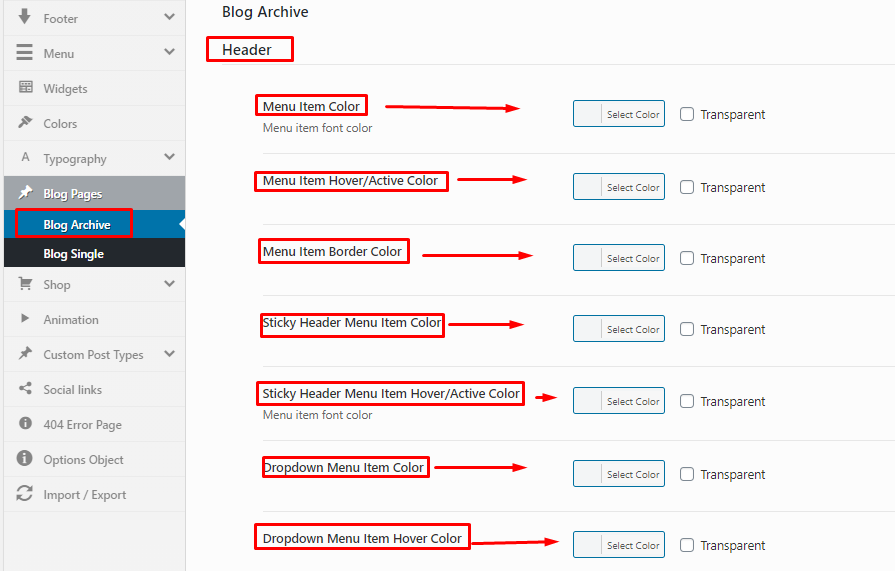
You can customize how the Blog Archive section will look from here. The customization options are mostly focused on colors. And you get to work on the following functionalities and their colors. Menu Item Color, Menu Item Color, Menu Item Border Color. Sticky Header Menu Item Color, Sticky Header Menu Item Hover/Active Color, Dropdown Menu Item Color, Dropdown Menu Item Hover Color and Use Sticky Logo Only functions can be customized from this section.
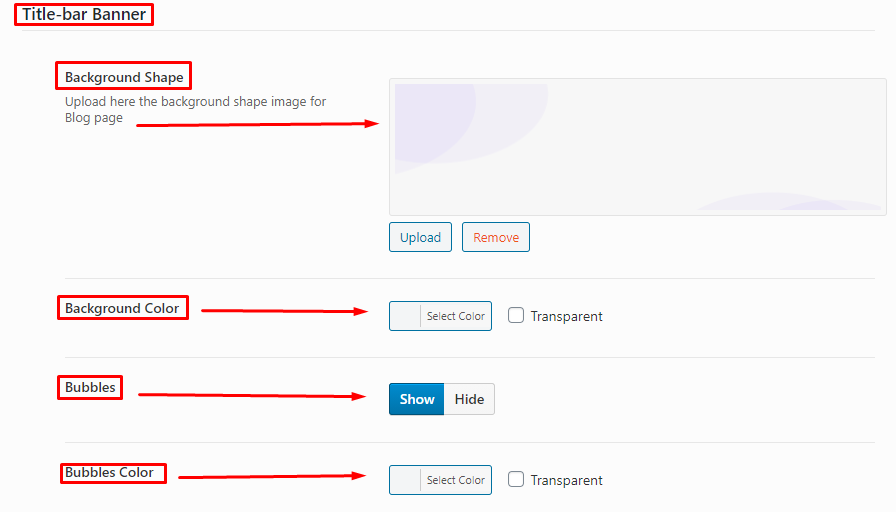
Title-bar Banner: You can customize the Title-bar banner by changing the Background Shape, Background Color, show or hide Bubbles, color of the Bubbles and more from this option. For uploading Background Shape,ensure the size of the images are appropriate.
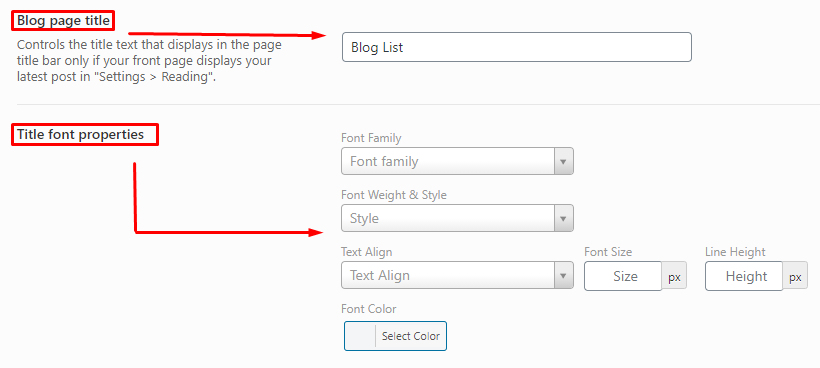
In addition to the above mentioned settings, you can also customize the following options. From the Blog Page Title, you can pick what the text should be on the title bar of your blog list page. You can also customize it further by adding and changing the Title Font Properties and customizing it further.
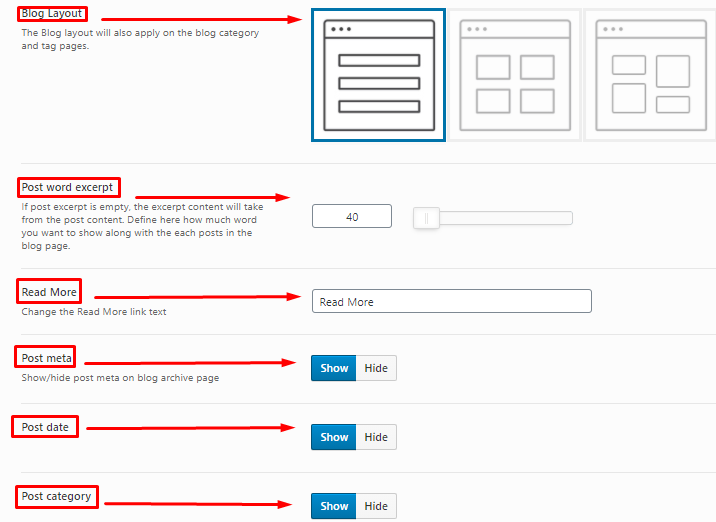
Plus, if you want to select a layout of your blog, you can finalize it from the Blog Layout section of this option. You can also customize the Post Word Excerpt and select the amount of words that will be visible as the excerpt of the blog. You can also select the Read More text, show/hide Post Meta, Post Data and Post Category.
Blog Single
Title-bar Banner: From this section, you can customize how the Title-bar Banner will look for a single blog. You can pick the Overlay Color, Overlay Color Opacity, Height, Background Image and also customize the Category Font Properties to bring changes to the fonts.
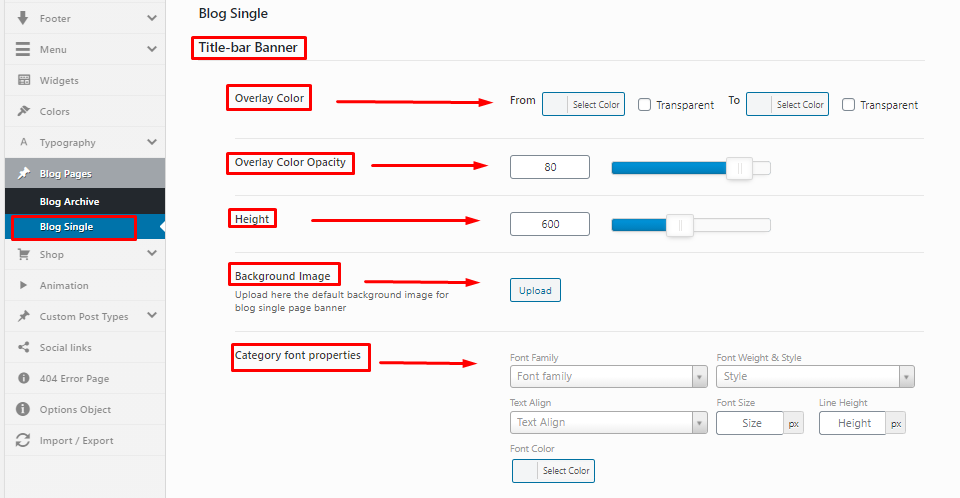
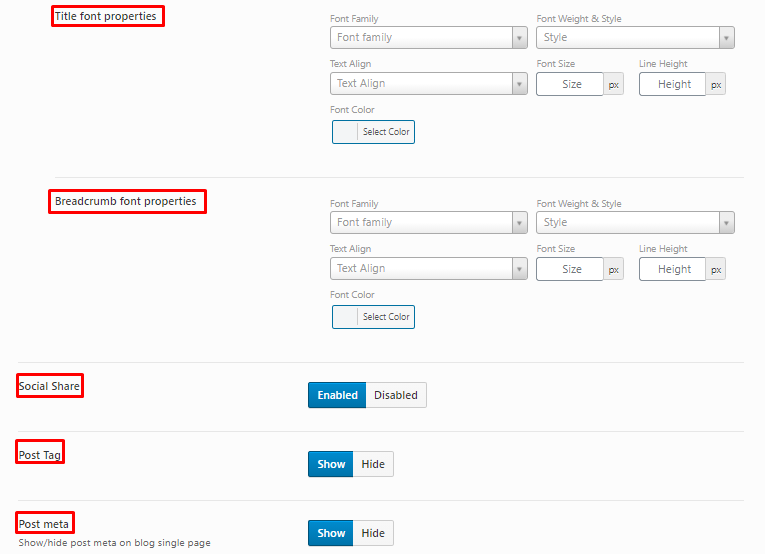
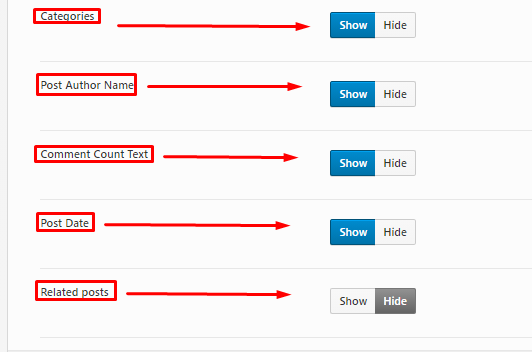
In addition to that you can customize the font properties for Title and Breadcrumb font properties. In addition to that, Social Share, Post Tag, Post Meta, Categories, Post Author Names, Comment Count Text, Post Date and Related Posts option of the blog. We recommend to show the social share, post tag categories on because it is helpful for the readability of the blog.